Author: Paul Stavrides

  • The AD Hiding in Your Air Filter

    The ADs You’re Probably Missing

    Call me a skeptic, but I doubt you’ve checked every AD that applies to your aircraft.

    The reason is a whole class of directives the FAA calls appliance ADs. These don’t attach to your airframe, engine, or prop — they attach to the equipment bolted onto them. The FAA doesn’t file these under “Other,” but it may as well. Part 39 defines a product as an aircraft, engine, propeller, or appliance — and that last word is where AD compliance quietly goes to die.

    Here’s why. When you search the FAA’s Dynamic Regulatory System (DRS) the way most of us do — by make and model — you get the ADs written against your airframe. What you don’t get are the ADs written against the things installed on your airframe, because those have no airframe make or model to match against.

    My favorite example is AD 84-26-02, for paper induction air filters. Virtually every piston-powered aircraft is capable of running a paper filter, so this AD should be marked in every logbook we examine — either complied-with or N/A. Most of the time, it’s missed entirely.

    Why? Because in DRS this AD has nothing in the Make or Model field (drs:adfrawdMake, drs:adfrawdModel). It has an effective date but no end date. It applies to all paper induction air filters used in small airplanes, and it wisely tells you to replace that filter every 500 hours. Good advice, but if you’re searching by airframe, you will never find it. (For the record: it applies to paper and cellulose media only, which is why some modern synthetic filters escape it. But that’s a determination, not a reason to leave the AD unaddressed.)

    And 84-26-02 is not unique. There are hundreds of these appliance ADs — roughly 500 at last count — scattered across every subject you can imagine, or as DRS calls them, the raw Subject variants. You might not have an APU. But there is a 100% chance your aircraft has seat belts, an altimeter, an air filter, an ELT, a fuel pump, a magneto — and every one of those is an appliance the FAA can, and does, write ADs against. None of them show up when you search by tail number’s make and model.

    Finding what airframe search can’t

    This gap is exactly what we built our AI system at LogAir.ai to close. Instead of searching by make and model and hoping nothing slipped through, we work the problem from the other end: we read your logbooks, establish what is actually installed on your aircraft, and then run that equipment against the full body of appliance ADs — not just the ones indexed to your airframe.

    We’re now closing in on complete coverage. The system examines your records, then makes a final pass keyed to the subject terms of every appliance AD in the set — filters, belts, altimeters, ELTs, and the rest — so nothing gets skipped merely because it never had an airframe make or model attached to it.

    The result is the compliance picture you thought you already had: not just the ADs the FAA hands you when you type in your model, but the “Other ADs” the FAA never had a category for — until now.

    Curious whether your logbooks are hiding a missed appliance AD? That’s precisely the question LogAir.ai was built to answer.
  • Public Benefit Call Signs

    When I talk to new public benefit flying pilots, typically the most confusing aspect of the conversation is the care and feeding of the unique flight call sign. I put together this video to help explain how they are used. Yes, the video is AI generated, but it does and admiral job at explaining the ADS-B concepts.

    As always, if you have any questions, please get in touch with me or the organization you are going to fly with.

    –paul

  • That Post AirVenture High

    I don’t know about you, but going to, being there, and returning from AirVenture is always an endorphin-producing high. There’s nothing like AirVenture in the world of aviation. Pure sensory overload—in the best possible way.

    This was my first AirVenture presenting in any capacity, and I had a blast preparing and talking to anyone who would listen. If you attended one of my talks, thank you. I hope I conveyed some of the advances AI is making in the general aviation maintenance arena and how you can do much of this AI work yourself.

    Of course, if you’d like some guidance—or maybe just want to save some time—you can always call on us here at LogAir.ai to help.

    I’ve attached my presentation slides from Oshkosh. At the bottom of the page there is an image that demonstrates why we always use image-based PDFs as input to the AI. As of this writing, Gemini Notebook is the star of the show.

    I also tried to convey just how challenging it is to identify every Airworthiness Directive that could possibly apply to your aircraft. It’s a much more difficult problem than most people realize. We’re working on that.

    We have new Chrome side panel extensions. They will be rolling out to current customers this week.

    Oshkosh AirVenture 2026 Presentation

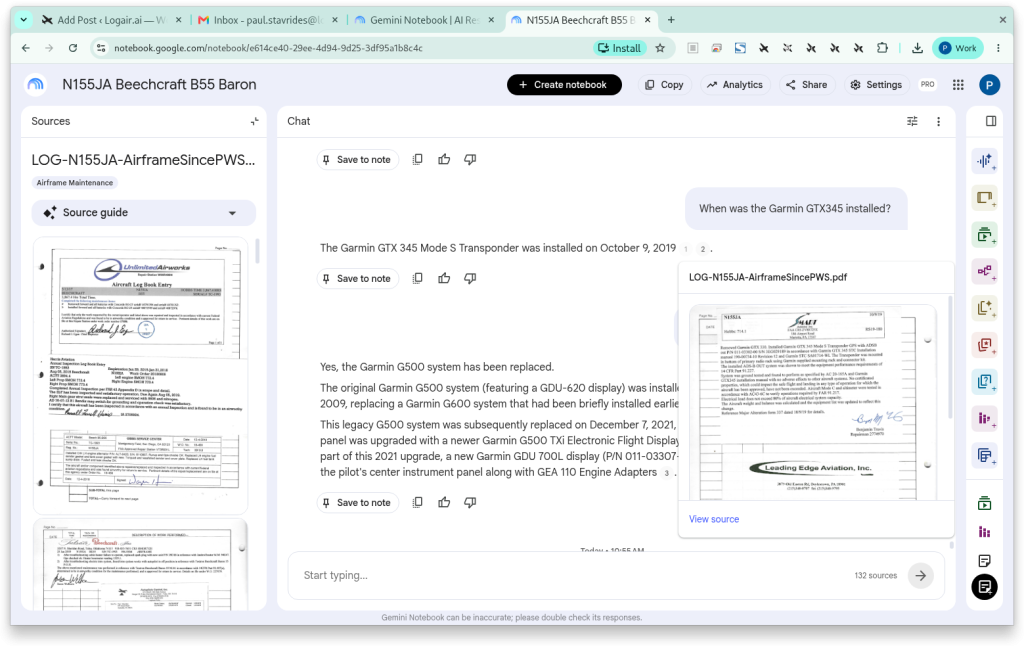
    Image Citations in Action

    Why you use image PDFs as input to the AI. Hovering over the superscripts in chat responses will highlight the exact page in the logbook where the information was derived:

  • AirVenture OSH 2026

    Thank you if you attended either one of my presentations at Oshkosh this year. It was my honor to talk to you about the fascinating subject of AI analysis of maintenance logbooks.

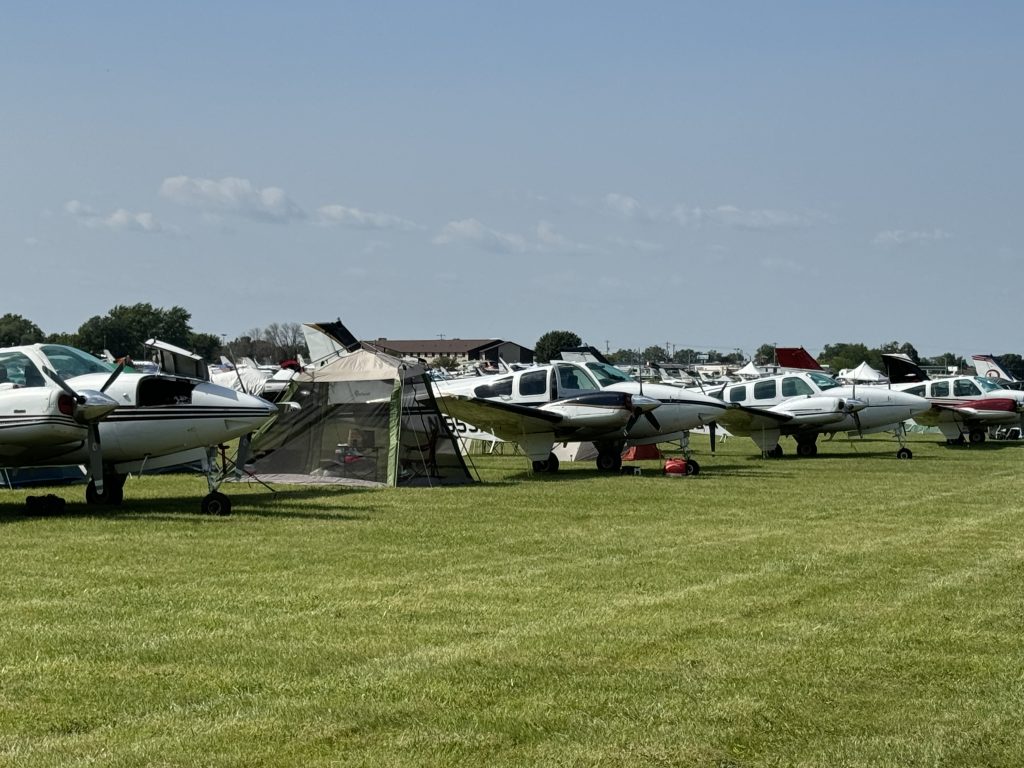
    I had a blast, of course, I always do. Flying in the B2OSH mass arrival is always exciting. Great job to the organizers of the event as always. This is one of the nicest and safest ways to get to OSH during show week even with the smoke.

    Getting a chance to talk to LogAir.ai customers and potential customers is enlightening. I strive to make the system more useful with every revision. We are making progress on the complete AD picture. Look for that rolling out as we as some new plug-ins for Chrome. Please sign up for our mailing list on the Getting Started page.

    I also noticed there are some other companies starting to offer AI-directed logbook analysis. We certainly welcome the competition, it proves that it was a good idea to offer it and make it easy to use. The piston-powered GA fleet will benefit from it.

    We can guarantee here at LogAir.ai there will always be a human in the loop.

    –paul

  • AirVenture 2026 – 54 Days and Counting


    I’m proud to announce that I’ll be speaking at the American Bonanza Society Tent on Monday at 9:00am and at Forum 9 on Wednesday at 8:30am. I got the early slots — no matter. It’s hard to sleep in at OSH anyway.

    I’ll be arriving with the B2OSH mass arrival and will probably be camped somewhere around Row 530. Please stop by, say hello, and ask about LogAir.ai. I’ll have the Starlink terminal set up and can demonstrate LogAir.ai’s capabilities if you have the time.

    LogAir.ai will also be offering a complete one-year Analysis Package (single or twin) for the B2OSH raffle. This is probably one of the best raffles at OSH — I’ve seen some incredibly expensive panel electronics given away over the years.

    I’m especially excited because we have several major developments coming to LogAir.ai. The frontier AI models have been advancing rapidly, and the results are showing up directly in what we’re now able to offer.

    By OSH, we’ll have a revamped website, new product offerings, and a money-back guarantee that we can build a meaningful RAG-AI model from your aircraft’s maintenance history.

    We’re also introducing new quantitative reporting capabilities, and we’ve integrated the FAA Service Difficulty Reporting database — over 7.5 million records — directly into the RAG-AI system at the core of LogAir.ai. Service Bulletins, Service Notes, and Advisories are now much easier to incorporate into the platform as well.

    To say I’m excited about all of this would be an understatement.

    Hope to see you at OSH!

    — paul

  • Sun-N-Fun 2026

    A big thank you to everybody that came to hear me speak about LogAir.ai at Sun-N-Fun. It was my first time as a presenter at any major airshow—it was a thrill.

    It was nice to connect again with some of my airshow friends and acquaintances.

    Sun-N-Fun looked to be busy and very vibrant with many new products and technologies represented. I’m thrilled to see Deltahawk and Rotax doing well. I was able to attend a lecture about the Rotax offerings—especially the 916is. Very impressive.

    Great flight from Orlando to Philly in the Baron. One hop. Close to two hours of fuel remaining when I landed. I slowed down a little to get better mileage. Even with the lower cruise at 5.1 flight hours logged, I’m pretty sure I’m faster door to door than the airlines. That, and I had 200 lbs of airshow goodies. Amazing what Beechcraft products can do.

    Cheers,

    –paul

  • AI Builds a Maintenance Spreadsheet – Update

    We know AIs are getting better and better at producing meaningful results. What if AI could construct a simple Maintenance Tracker spreadsheet from your data? That would certainly save some time.

    Well with the LogAir.ai system and a little bit of AI know how you can do this easily.

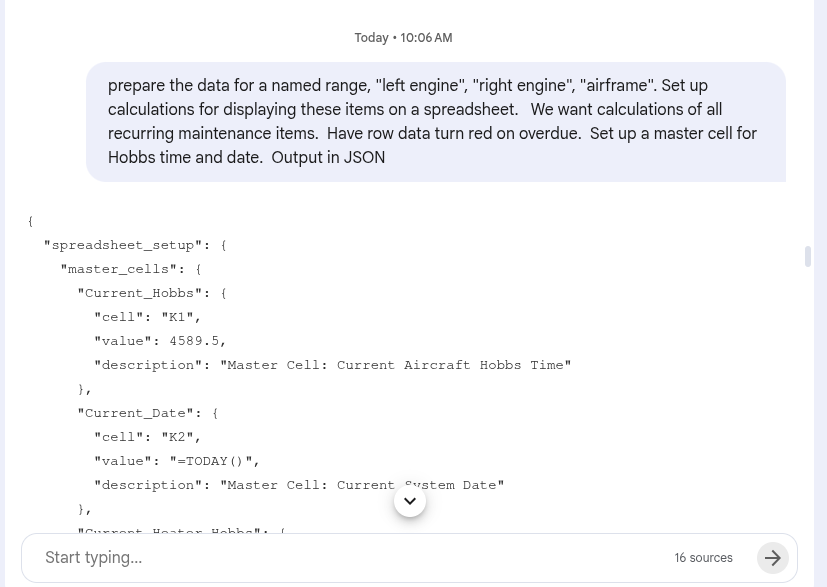
    First let’s ask NotebookLM, charged with your aircraft data, to give us the data needed to build a spread sheet. NotebookLM will know the recurring maintenance items and their Time In Service (TIS). It will also know recurring items like recurring ADs. To put this together we’ll ask the AI to output everything we need to build a spreadsheet. We ask this in JSON format — JavaScript Object Notation — a format well known to both AI systems and spreadsheet programs. Here’s the prompt:

    Prompt to NotebookLM asking it to prepare data for a spreadsheet

    Ok a slight twist now. One would hope you could go right to Gemini and ask it to make a spreadsheet. The only issue, Gemini doesn’t yet know how to make a spreadsheet. Oh well, let’s try OpenAI. Guess what? OpenAI will happily create and output a downloadable .xlsx file. It pays to shop around.

    EDIT: One of the I love about the AI movement is the constant improvement. Gemini can now export all Microsoft file formats. It makes the job even easier…

    Ok so I paste my JSON data into the chat window of an OpenAI and ask for a spreadsheet to track aircraft maintenance. I asked for a set of cells in the upper left hand portion of the spreadsheet to enter the Hobbs time and date. It knows how to handle the items either by Hobbs time or calendar time.

    Click for larger

    OpenAI took a few minutes to return this file. Quite frankly, I am amazed at how good a job it did constructing the spreadsheet. The machine knows the difference between calendar time maintenance and operational hours (Hobbs) maintenance. The due soon feature is a nice touch. I didn’t ask for that. It would have taken me several hours by hand.

    Now that you understand the process, it’s an easy matter to revise the resulting spreadsheet by prompting the NotebookLM model or OpenAI.

    Let me know if you find this helpful…

    –paul

  • ABS Magazine Article

    Presentations:

    Sun-N-Fun – Lakeland Florida, April 15-16 11:00am
    I’ll be speaking at Sun-N-Fun on How AI is Bring Insights to Maintenance Logs. We’ll let you know where we are and where we’re headed.

    Ariticles:

    American Bonanza Society Magazine – February 2026 issue: How AI Unlocks the Hidden Intelligence in Maintenance Logs

  • Scanning Your Logbooks

    Hint: Use Your Phone

    I get a number of questions about scanning logs. The most important thing is to avoid procrastination and make some time to get the task done.

    It’s really inexpensive to use a cell phone camera to PDF scanner application. Many modern cell phones have camera resolutions that will yield a greater than 300 DPI scan for an 8 1/2 x 11 in page. Remember to scan everything in your log. It’s a pain to unstaple the 8130 forms, scan and reattach them, but this adds value to the scanned record. In this way you get overhaul information including who overhauled the part and its serial number. Sometimes ADs pertain to certain serial numbered parts. The RAG-AI can keep track of it all.

    Make sure the 8130 or other forms you find in your logbook are scanned in the order they appear in your logs. For best results scan those tags with a separate scan which will form a separate page. It’s best not to have any scan that is bigger than 8 1/2 x 11 inches.

    Another consideration is that we don’t need to do Optical Character Recognition (OCR) on these files. Leave them as image PDFs. The Google AI API in the LogAir.ai system is by far the best OCR and the files will be converted on the fly when using the LogAir.ai system.

    Their are various YouTube videos explaining using your phone to do the scanning. One of my favorite ones is here:

  • German, Spanish?

    I talked with a Baron owner today, he mentioned that his aircraft was at one time operating in Germany and that a portion of his logs were in German. I wondered if this would be a problem for the Google AI we’re depending on for our OCR capabilities at LogAir.ai. As I suspected, the Google Documentation API which does the original OCR of maintenance logs, recognizes Germain as well as Spanish, and about 130 other languages.

    So while we haven’t converted any foreign language logs, it should be entirely possible to do this and print them in English with a simple command.

    We’ll let you know how this goes.

    –paul